
Comparisons · November 9, 2026
Upskillable vs Sana Learn
 Romain Gagnon · November 9, 2026 · Founder & CEO
Book a 20-Minute DemoGet a pilot estimateAsk a quick question
TL;DR
Upskillable connects content production with contextual coaching. Create courses, videos, slides, documents and podcasts, reuse the learning brief, and bring supporting material back into the course.
Keep creation, maintenance and coaching connected. Source relationships help authors identify work to review and update. In the learner portal, the AI Coach uses course content, progress, role, required skills and learning goals to guide explanations and practice.
Sana also provides contextual tutoring and source-led course creation. Its programs and integrations deserve a close look. Choose Upskillable when your priority is detailed content production, source-aware maintenance and coaching connected to role and skill requirements in one platform.
Swipe the table sideways to compare all platforms.
| Capability | Quick answer | Upskillable | Sana Learn |
|---|---|---|---|
| Narrative learning design | Upskillable strength: editable story continuityPlan how the explanation develops across the course, beyond a list of topics. | Shape the learning goal, audience, setting, stakes, running example and final outcome. Edit the narrative throughline and individual lesson story beats before building pages. | Course outlines, instructional-design prompts and outcome-based assessment creation. Sana Edit mode |
| Truth ledger and source checks | Upskillable strength: teaching-to-assessment consistencyUse the same planned facts in the explanation, examples and questions. | The course truth ledger carries claims, figures and units, source-evidence references, decisions, outcomes and assessment bindings into lessons and quizzes. Source checks flag contradictions, unsupported claims and missing qualifications for review. | Source-based course editing and a validated outline in Tutor mode are documented. An equivalent shared claim/figure-to-assessment ledger is not established. Sana Edit mode Tutor planning |
| Convert and output lineage | Upskillable strength: linked repurposingReuse an approved teaching structure in another format and retain its origin. | Repurpose an eligible saved Course outline into Document, Podcast, Mindmap or Scenario outlines. Choose the document template and retain a link to the original. Scenario conversion provides an editable starting structure; authors add branching decisions. Lineage shows direct source/derived-output relationships and source revision freshness. Source usage separately identifies saved projects that reference a removed or archived source and opens them for review. | Source-based course creation and content history are documented. Equivalent linked Course-outline-to-document/Podcast conversion is not established. Sana Edit mode |
| Localization | Both support: localizationUpskillable adds reviewed outputs across formats; Sana groups translated course editions. | Localize Course, Document, Podcast, Scenario, Mindmap and Presentation content with translation review, terminology rules, translation memory and issue resolution. Approve a linked language version; source freshness is checked before approval. | Multi-language translation, terminology rules, engine selection and grouped course editions. Preserves interactive blocks and branding; reviewers can edit before publishing. Editions can match the learner’s profile language; changes to an original do not automatically update translated editions. Sana translation · Course editions |
| Sources and planning | Both support: source-led authoringBoth turn sources into editable learning plans. | Generate Studio combines selected sources, audience, learning objectives, planning conversation, and a reviewable outline before course creation. | Generate editable outlines and course cards from files, derive learning outcomes, and review, accept or discard proposed changes. Generate from file · Edit mode |
| Course design | Upskillable leads: design controlMore granular control over the page and its individual elements. | Build with rows, columns, reusable blocks, and AI editing. Control styling at theme, page, component, and text level, with individual overrides. Create a consistent course without giving up control of a particular activity. | Sana supports cards, blocks, columns, table styling, and reusable templates. Its documented editor does not establish an equivalent four-level styling cascade. Course editor |
| Themes and reusable templates | Both support: branding and templatesUpskillable leads granular styling; Sana documents a large ready-made library. | Apply and reuse course themes, page templates, and component styling. Typography, colors, and layout flow through the course, while local overrides let authors refine individual pages and blocks. | 150+ templates, custom organization templates, uploaded headline/body fonts, and brand colors. Sana’s library is substantial. Templates · Branding |
| Custom interactive content | Upskillable leads: native component depthA broad editable component system, beyond AI-generated embeds. | 115 component definitions, including layout and composed variants, combine visual storytelling with interactive learning: themed layouts, tabs, buttons, comparisons, charts, interactive calculators, prompt-generated fluid diagrams, questions, sorting activities, flashcards, hotspots, polls, and tracked checklists. Authors can also build branching pages and embed mind maps. | Native questions and activities plus AI-generated Studio cards for games and visualizations. Published Studio cards support search and translation, but their interactions are not saved, reported or tied to completion beyond viewing. Sana’s guide gives conflicting statements about Tutor access to Studio-card content; verify that behavior in your workspace. Dedicated assessments and scenarios provide separate tracking. Studio cards |
| Questions and assessments | Both support: questions and assessmentsTest knowledge and use the results to guide learning. | Create single-choice, multiple-choice and true-or-false questions, use assessments in courses, and review learner attempts and scores. | Create questions and assessments with passing scores, time limits, retry settings, answer explanations and question variations. Questions and assessments |
| Podcast production | Upskillable strength: course-linked Podcast workflowCreate the audio in Studio, return to the course, and insert the saved result. | Create a Podcast from a course brief, edit the script and voices, generate audio, return to the original page, and insert it. Reopen the same saved project to continue editing. | Recorded, uploaded, and AI narration are documented. A matching standalone script-to-Podcast studio and course-return workflow were not established. Narrations |
| Documents, SOPs, and job aids | Upskillable leads: native document productionCreate editable working documents and bring them back into the lesson. | 19 document templates include SOPs, controlled procedures, handbooks, training manuals, job aids, newsletters, agendas, strategy briefs and executive reports. Create editable text, lists, tables and callouts, with template-specific purpose and content guidance. From Course Builder, carry the brief into SOP creation, then return to embed a PDF or add an open-document button. | Course content, reusable templates and uploaded references are supported. An equivalent dedicated document-production-and-return workflow is not documented. Sana authoring |
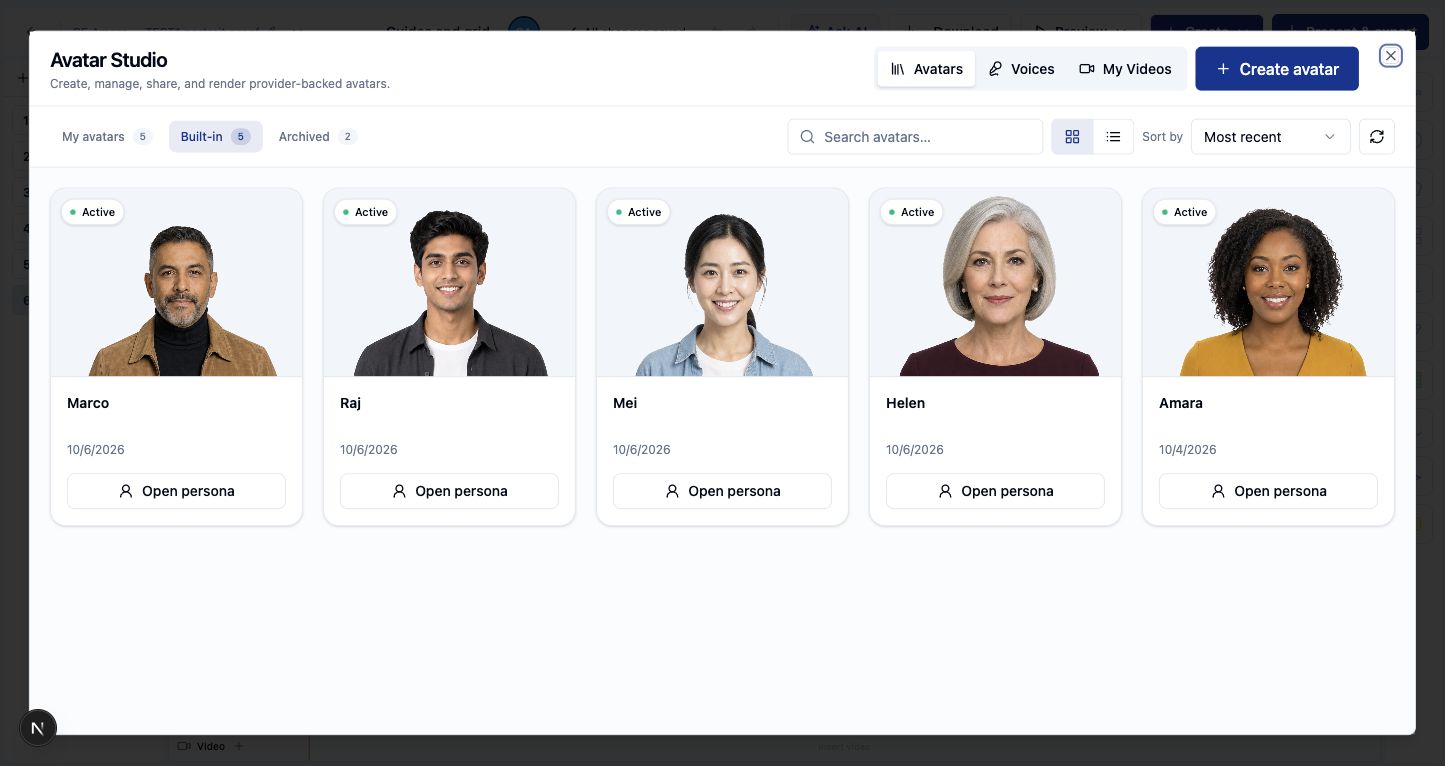
| Presenter media | Upskillable leads: integrated production depthBoth generate avatars in-app; our advantage is the surrounding Studio. | Avatar Studio offers five built-in presenters and saved presenter clips directly within the Slides workflow. Combine the presenter with editable scenes, narration, captions, lighting, and timed motion. Media generation uses external providers behind the integrated editor. | Generate an avatar inside a Video card or Page video block, using a written script or course-derived context. Sana’s subprocessor list names Synthesia for avatar generation; the creator workflow remains inside Sana. Avatar workflow · Subprocessors |
| Slides, animation, and timing | Upskillable leads: scene productionFine control over how an explanation unfolds. | Edit element timing, entry/exit/loop animation, easing and motion paths; add spot or beam lighting with intensity, timing, and fades. Use color grades, scene transitions, narration, and captions. Saved scenes remain editable. | Generated Studio-card visuals and interactions are documented. A comparable scene editor with lighting, element motion paths, and production timing is not established in the reviewed documentation. Studio capabilities |
| Review and version history | Both support: revision historyCompare what changes for existing learners and managers. | Publish course editions with page and theme snapshots. In a local content-update walkthrough, new starters received the latest edition, while an existing learner kept their original assessment results. Separate local checks showed a learner change logbook and edition and attempt details for managers. | Review published changes and see which course version a learner completed. For program outline changes, choose whether to update new learners, learners in progress, or everyone. Version history · Program updates |
| Onboarding and learning paths | Sana leads: program sequencingBoth target learning; Sana adds documented email steps and staggered unlocking. | Target learning paths by department, site, group, and job role. Enroll the relevant audience into required or optional courses, use sequential or flexible progression, and include scheduled session selection. | Programs combine courses, live sessions, email, staggered steps, and enrollment rules. Completed content remains accessible. Programs |
| Placement and adaptive guidance | Sana leads: placement-based skippingStart experienced learners further ahead when they demonstrate what they know. | Living Courses use learner progress and mastery signals to adapt AI Coach guidance and practice. The same module-skipping placement workflow is not established in this review. | Optional module placement tests use course questions to mark mastered material complete; personalized reviews focus on missed questions. Placement tests and reviews |
| Review after learning | Both support: returning to practiceThe timing and learning experience differ. | Living Courses schedule AI Coach check-ins after accepted practice at three, seven and 30 days, including a later prompt about applying the skill at work. Local learner records show scheduled and completed check-ins; ask to see the experience with your course. | Smart Reviews send AI-generated recap cards 14 days after completion of an eligible Sana self-paced course; authors can review the cards. Smart Reviews |
| In-course coaching | Both support: contextual tutoringBoth use course context and learner progress; compare the role and memory details in a pilot. | AI Coach uses course content, progress, job role, required skills, learning goals, and learner-confirmed memory. Ask for an explanation, work through a task, or revisit a saved coaching conversation. | In-course Tutor uses course content, objectives and learner progress for explanations, quizzes, examples and guided reasoning. Tutor in Search adds learning plans and saved threads. In-course Tutor · Tutor in Search |
| Coaching and roleplay | Both support: practice and feedbackBoth support scenario practice; Upskillable connects results to manager follow-up. | Practice roleplays, receive criterion-based feedback, and retain attempts and missed-skill summaries. Managers can review individual and team results to identify follow-up learning. | Text or voice roleplay with defined roles, source context, completion criteria, and feedback. Scenario cards |
| Multilingual coaching: text and live voice | Upskillable: 15 locale choicesAsk questions and practice in a chosen language; exact Sana parity is unconfirmed. | AI Coach replies and live voice share 15 Portal language/region choices, including English, French, Spanish, German, Italian, Japanese, Korean, Portuguese, Swedish, Filipino, and Chinese. The learner can change and retain their choice. This is distinct from translating every course page or quiz. | Sana supports text and voice scenarios, with language limits documented separately. An equivalent locale-by-locale Tutor comparison has not been established. Voice scenarios |
| Skills and task capability | Upskillable leads: role-readiness workflowConnect requirements, evidence, gaps, and the next learning action. | Set required skills and proficiency by role or group. Skills Matrix surfaces missing, below-level, expiring, expired, and pending-approval evidence. Link skills to relevant learning and follow each learner’s requirements, evidence, and next actions. | Custom skills, proficiency and target levels, plus reviewed content-tagging suggestions. A matching role/group readiness and renewal-evidence workflow is not established in the reviewed guide. Skills |
| Certifications and renewal | Both support: renewalUpskillable adds versioned policies and supporting qualification evidence. | Version renewal policies, preview their impact, track individual expiry, and recertify with supporting evidence and optional approval. Preserve history as qualification status changes. Completing a course does not automatically prove or renew a skill. | Issue certificates with validity periods, expiry reminders, and renewal through progress reset. Previous records are retained. Certificates |
| Skills linked to company goals | Upskillable leads: goal-readiness workflowSee how skills and learning support organizational objectives. | Define goals and periods, add required capabilities, review suggested skill/course links, and confirm the alignment. Monitor readiness against those confirmed links as learner evidence changes. | Skills and proficiency targets are documented. An equivalent company-goal alignment and readiness workflow is not established in the reviewed Sana Learn guide. Skills |
| Learning reports | Both support: learning reportingUpskillable also supports natural-language investigation. | Analyze turns learning-data questions into charts and record views. Existing owners cover enrollments, progress, skills and role readiness; manager roleplay views add attempts and missed-skill summaries. | Insights reports on learners, content, skills, and engagement. Insights |
| VILT and live learning | Both support: live trainingManage scheduled learning alongside self-paced courses. | Schedule sessions in calendar or list views; manage time zones, conflicts, capacity, registration, approvals, waitlists, attendance, and calendar invitations. | Sana Live supports virtual and hybrid training with meeting-tool configuration and interactive learning. Live setup |
| Live session recaps | Sana strength: automatic live recapsSee what happened after the session. | Schedule live sessions, track attendance and use learning materials alongside the session. A comparable automatic meeting recap workflow was not established in this review. | With its notetaker admitted to the meeting, Sana records and transcribes a live session and makes a summary searchable. Live recaps |
| External organizations | Both support: external learning audiencesBoth support learning beyond the employee population. | Create external organizations with branded customer portals, organization administrators, catalogs, enrollments, access codes, and seat or email-domain rules. | Parent/child instances separate users, branding, and administration while distributing self-paced courses. Representative setup and documented limits apply. Multi-tenancy |
| Signals | Upskillable distinction: contextual opportunitiesA matching Sana workflow was not established. | Signals reviews available sources, research, and learning to suggest useful additions you may not have considered. Each suggestion identifies a learner outcome, evidence, and next action. It reviews the supplied context, not every document in the organization. | A matching context-based opportunity-discovery workflow was not established in this review. Content synchronization and program rules cover some adjacent needs. Integration scope |
| AI Insights and Analyze | Upskillable distinction: coverage-to-actionSana also reports on skills; exact workflow equivalence is unverified. | AI Insights detects gaps in existing skills, roles, coverage, and activity. For example: a required skill has no mapped course. Analyze exposes supporting records; reviewed skill-gap actions can create a missing skill or start content for an uncovered skill. | Insights dashboards provide learning metrics. MCP can also expose permitted content and insight queries to an AI client. Metrics · MCP |
| SCIM provisioning | Sana leads: documented provisioningBoth have provisioning implementations; the Upskillable path is currently limited to local test tenants. | SCIM 2.0 user and group provisioning, profile updates, deactivation, mapping, conflict and retry handling are implemented for local test tenants. | Documents identity-provider provisioning for users, profile changes, groups and deactivation. Sana integration guide |
| LTI | Upskillable strength: LTI 1.3 supportLaunch learning from a compatible external LMS; Sana support is unconfirmed. | LTI 1.3 covers platform registration, secure launch, course binding, and learner handoff from another LMS. | LTI support was not established from the reviewed documentation. SCORM and content-library integrations are documented separately. Integration guide |
| SCORM import, conversion and delivery | Both support: SCORM deliveryCompare supported versions, storage setup and export requirements. | Direct SCORM 1.2 learner launch with saved progress is implemented where course storage is configured. Separately, the SCORM converter extracts supported package content into editable native course pages. This code review does not establish deployment availability or SCORM 2004 runtime support. | Import SCORM 1.2 or 2004 packages for learners, convert SCORM files into native course content, and export a connected SCORM package to another LMS. SCORM import · Convert files · SCORM export |
| MCP access from an AI assistant | Sana leads: documented action breadthCompare the actions available in your own environment. | Upskillable provides MCP tools for learning information, AI Coach and course-authoring workflows. A course build creates a draft for review, not a published course. | Sana documents course creation and editing, assignments, programs, sessions, certificates and learning queries from connected assistants. MCP guide |
| Browser WebMCP | Upskillable strength: in-app assistant toolsWork with supported page context in a compatible browser. | In Generate Studio, a browser assistant can set up a course with sources, answer questions about the selected documents, draft an outline and check build status. In Engage, assistants can work with selected course and enrollment context. The creator starts the build in Studio. | Browser WebMCP support is not established in the reviewed documentation. Sana's remote MCP is a separate interface. Sana MCP |
| Connectors and interoperability | Sana leads: connector breadthUpskillable already covers several important learning and workplace connections. | Integration paths include Zoom, Teams, Google Meet, Slack/Teams notifications, Confluence sources, SSO, SCORM conversion, and xAPI/LRS forwarding. SCIM, LTI, MCP, and WebMCP are distinguished above. | Documents a broad HRIS, identity, CRM, content, notification, and reporting ecosystem, plus SCORM import/export. Scope and setup vary. Integration capabilities |
| Branching scenarios and missions | Both support: scenario practiceUpskillable combines native branching authoring with saved AI Learning missions. | Create branching scenarios, edit decisions and outcomes, and deliver AI Learning missions with context, choices, consequences, debrief and saved progress. Text/live-voice roleplay adds feedback and follow-up. | Text/voice Scenario cards support defined roles, source context, completion criteria and feedback. Scenario cards |
Verdicts describe the named workflow. “Both support” means the named capability exists in each product, not that the workflows or depth are identical. “Leads” marks a specific advantage supported by reviewed evidence. An outlined verdict marks an Upskillable strength where the comparison is not established. It does not mean Sana lacks the feature.
Key comparison sources and remaining workflows reviewed October 29, 2026. Upskillable implementation evidence and observed local workflows are distinguished in the review. Upskillable claims were checked against current code and dated local product evidence; Sana claims were checked against official documentation. This is not a matched hands-on benchmark. SCORM implementation, component counts and Studio-card Tutor documentation rechecked November 9, 2026. Specific rollout gaps are identified where they affect the comparison.
Signals asks: what useful learning could we be missing? It uses the available context to surface opportunities. AI Insights asks: where are the gaps in what we already manage? It checks existing skills, coverage, and learning activity. Related skill-gap review actions can create a missing skill or start content for an uncovered skill; these are reviewed actions, not automatic publication.
Generate Studio’s foundations: plan, check and reuse
Design the narrative before building. Set the learning outcome, shape the setting and stakes, and edit each lesson’s story beat. The final outcome gives the course a destination beyond completing a list of topics.
Keep the facts consistent. The truth ledger connects claims, figures, decisions and assessment targets. Source checks help flag unsupported statements, contradictions and omitted qualifications. This supports review and consistency; it does not guarantee that every generated statement is correct.
Turn the same teaching work into useful formats. Convert an eligible Course outline into a document, Podcast, mind map or scenario starting structure. Choose a document template, review a localized version, and inspect the source/derived-output relationship. Lineage, source usage and localization are distinct controls that work together; they are not automatic rewriting of every derivative.
Add supporting material where it belongs. From Course Builder, bring the learning brief into Studio to create a Podcast or document, then return to the course to add the saved result. Review the output before using it. Native branching and roleplay provide additional ways to practice within the learning experience.
What to ask us to demonstrate
Start with one onboarding task and the source that explains it. Review the learning outline, build practice around the decision, and let the learner return to the same Living Course with AI Coach guidance. Saved learning context matters when the employee needs help again after onboarding.
Ask the AI Coach for guidance tied to the learner’s role and required skills, then return to the saved conversation. Try the same task by text and live voice in the learner’s chosen language. For managers, inspect the skill evidence and follow-up actions, not just course completion.
Visual storytelling and learning activities in one builder
Course Builder combines a deep component system with a theme-to-text styling cascade. Authors can mix questions, tabs, buttons, diagrams, calculators, and branching activities, then reuse themes and templates. The advantage is control: build the interaction the task needs without flattening every lesson into the same layout.
- Structure and navigation: themed layouts, rows and columns, horizontal and vertical tabs, accordions, buttons, and numbered sections.
- Explain and compare: before-and-after, pros and cons, cause and effect, myths and facts, callouts, tables, and step-by-step visuals.
- Explore ideas and numbers: interactive calculators with sliders and live results; bar, line, area, pie, and combination charts; prompt-generated fluid diagrams, cycles, funnels, pyramids, quadrants, and timelines.
- Practice and assess: questions, sorting activities, polls, flashcards, image hotspots, evidence missions, choice missions, and tracked checklists.
- Bring media into the lesson: images, audio, video, PDFs, slide embeds, and external interactive content.
Choose a presenter, then shape the explanation
Avatar Studio and Slide Studio serve different parts of production: selecting presenter media and controlling editable scenes, narration, captions, and timing. Ask to see the exact output and editing workflow you need.
Sana’s avatar workflow is also inside its course editor. Authors can choose an avatar and generate a script from preceding cards or the current card, depending on the video block. A provider relationship with Synthesia does not establish that authors leave Sana or lose course context. See Sana’s documented workflow.
Create supporting audio and reference material
Create a Podcast script and voice recording or an editable SOP from the learning brief. Return to the course to insert the audio, embed the PDF, or add a document button. Keep the saved Studio project available for the next update.
Choose around the work you need to finish
Upskillable’s strongest fit is ongoing role-based learning with production tools close at hand. Build the lesson and supporting media, provide practice and AI Coach guidance, and inspect the evidence available to a manager. Design control, integrated production, and the connection between skills, qualifications, and company goals are the reasons to shortlist us.
Sana’s clearest documented leads here are integration breadth, staggered program steps and documented MCP action breadth. Its grouped language editions are a specific management strength; localization itself is shared. If those decide the purchase, take them seriously. Sana also has in-course avatars, live learning, external organizations, skills, and version history.
Living Courses do not mean every source change automatically rewrites every lesson, Podcast, and assessment. Authors still review and release changes. Sana’s version history and synced program sections also support maintenance. Test the same update-and-return scenario with both vendors.
Keep Sana Learn separate from the wider Workday offering. Sana Coach and Workday’s broader Sana experiences include early-access capabilities and workforce context that cannot be assumed in every Learn subscription.
Bring one source, one role, and one task. Ask both vendors to create the learning, demonstrate practice and feedback, reopen the saved result, and show what the manager sees. Explore Upskillable.
Written by Upskillable. This is a workflow and documentation comparison, not a hands-on Sana benchmark. Prices, contractual security, accessibility conformance, and every customer deployment configuration are outside this review. Unknown capabilities are not marked absent.
Frequently asked questions
When is Upskillable a better fit than Sana Learn?
Upskillable fits L&D teams prioritizing source-grounded multi-format production across eight formats, source-aware course maintenance, and AI coaching connected directly to role skill requirements and evidence.
How does AI coaching compare between Upskillable and Sana Learn?
Both platforms offer AI-assisted tutoring grounded in company content. Upskillable’s AI Coach inside Living Courses additionally draws on learner progress, job role, required skills, and Memory Trust Center preferences.
Does Upskillable include video and podcast production alongside courses?
Yes. Generate Studio includes Slide Studio, Video Avatar Studio with voice synthesis, and Podcast creation from the course brief, with audio podcasts insertable back into Course Builder lessons.
How should buyers test Upskillable against Sana Learn?
Bring one real SOP or onboarding document and compare end-to-end authoring fidelity, source update tracking, in-course learner coaching, and manager skills-gap evidence.
Connect with us
Tell us what you are trying to get done.
This form reaches the Upskillable team. It is not a public comment thread. Prefer the longer path? Use Get started.
Prefer email? Reach us at hello@upskillable.ai.
Keep reading
Comparisons
Upskillable vs Articulate 360: Storyline, Reach & Localization compared
Compare the full Articulate 360 suite (Rise, Storyline, Review, Reach, Localization) against Upskillable on browser authoring, bilingual updates, AI Coach, and LMS delivery.
Romain Gagnon · November 17, 2026
AI Authoring
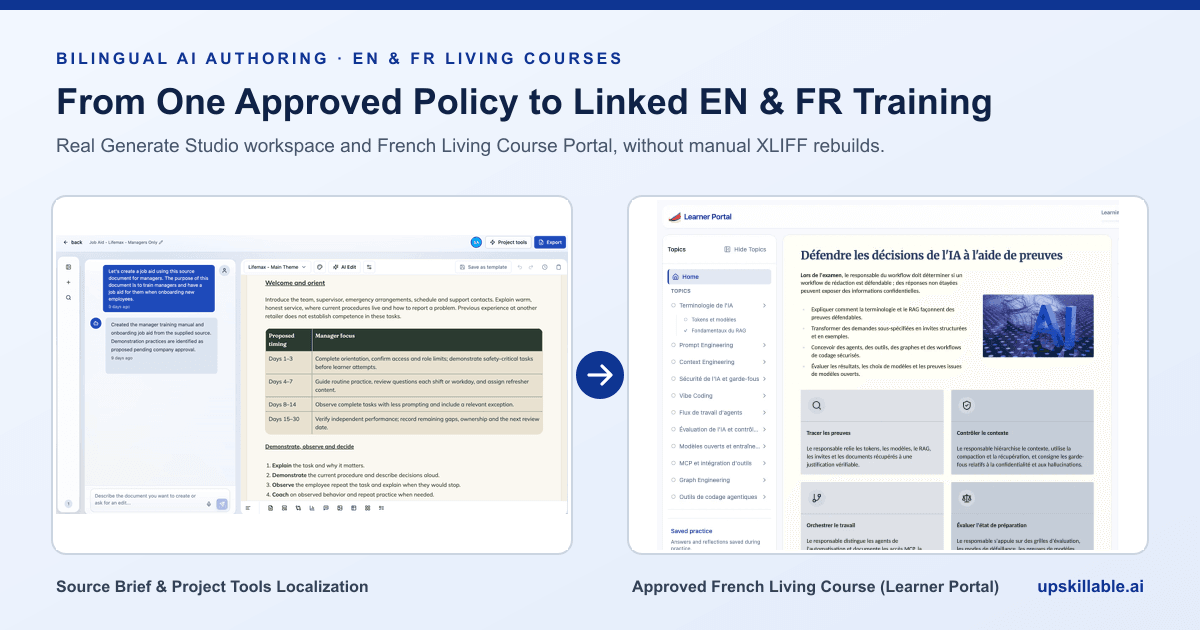
How to author bilingual French and English training without XLIFF rebuilds
Replace slow manual XLIFF handoffs and duplicated EN/FR SCORM packages with source-grounded Generate Studio localization, terminology memory, and human approval.
Romain Gagnon · November 17, 2026