
The guidance for changed customer scope now includes the revised approval role.
Applied topic update · Open in courseLearner Portal / Learning in context
Your course. Your context.
An AI Coach that connects them.
Learn with an AI Coach grounded in the course you are taking and the work you need to do. Bring the lesson, its purpose, and your next step into the same conversation.
Most learning assistants search your documents. This AI Coach knows why the course exists, what changed in it, and the task you are about to do.
uCourse experience · Lesson 4Avery · Learner
LESSON 4 / APPLYING THE IDEA
What changes in the customer conversation?
Use the new approval path when the request changes the customer’s risk or scope.
Supporting course source
Approval paths · released course material
Approval paths · released course material
Course outline and objectives. Lesson and narrative. Applied updates. Relevant role, skills, and task context. Guidance starts with the learning and work around you.
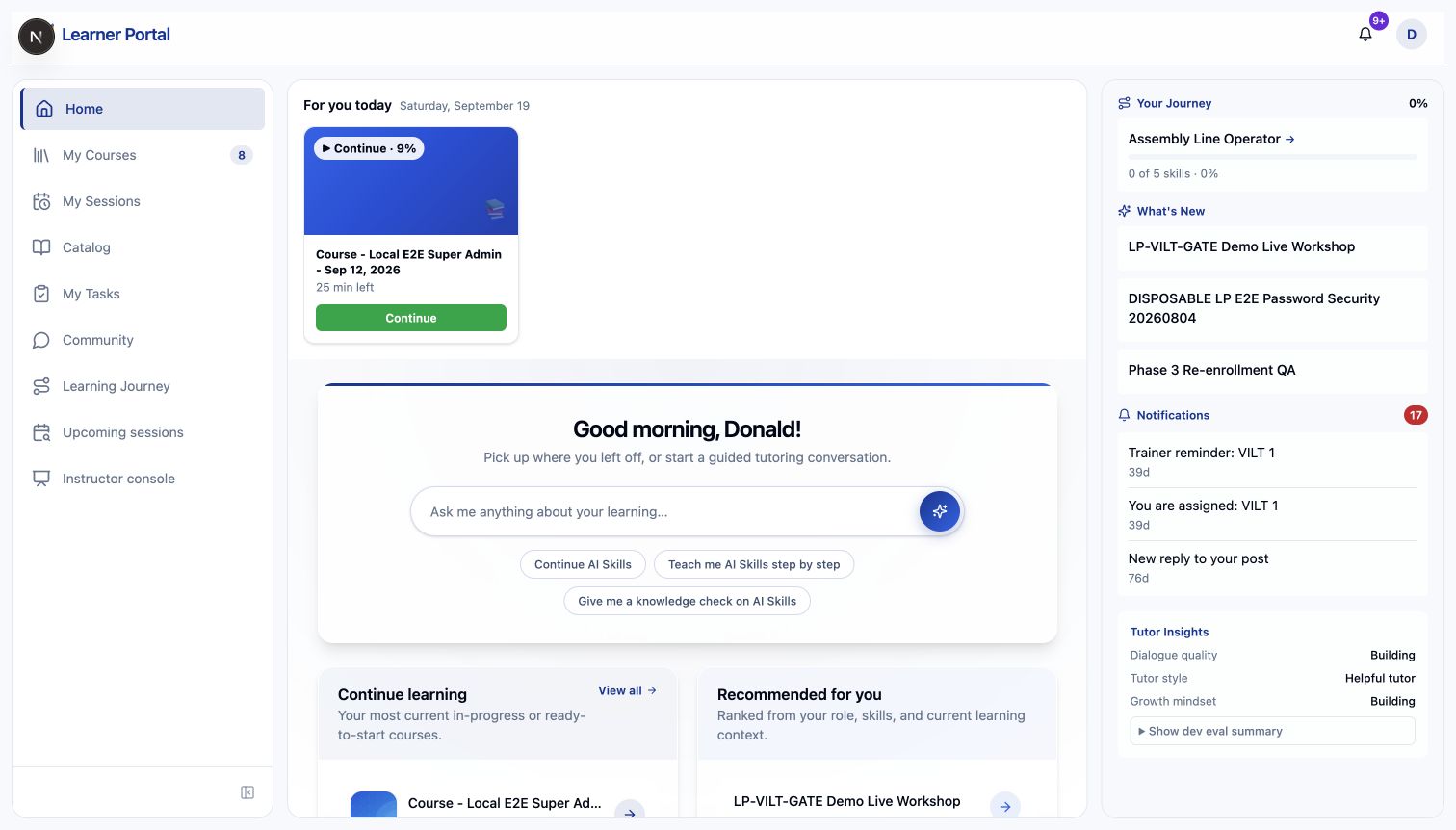
01 / Pick up where you left off
The next activity is easy to find.
See enrolled courses, progress, and the action that moves the learning forward. Continue an active course, launch a course you have not started, or follow the access state shown for you.
Learning in one place
Home, My Courses, learning paths, and the catalog give the journey a clear shape.
Progress with meaning
See where you left off and which activity comes next.
Sessions alongside courses
Find scheduled learning alongside your courses, with registration and joining in the same journey.
Inside the learner Portal
A place to pick up the conversation.
Start from your Portal home. Ask about your learning, continue with the AI Coach, or work through a knowledge check.
02 / Living Course
The change arrives in the learning.
Apply an approved topic update to a Living Course and bring the change into the existing enrolled experience. Learners revisit the updated topic without starting the course from scratch.
COURSE UPDATES
Current courseWhat changed in this course?
Try the short decision task after reviewing the updated example.
Course activity · Continue learningSee the topic update.
A dated update entry gives the learner a clear reason to revisit the course.
Keep the course thread.
The update belongs beside the current course experience rather than starting a separate rebuild.
Ask about the change.
Applied topic updates inform the AI Coach’s guidance on that topic.
03 / Ask about the lesson in front of you
The context behind a useful answer.
The course has a purpose. The lesson has a place in the story. The learner has work to do. The AI Coach draws on that structure to connect an explanation to the next decision.
What the learner is here to learn.
The outline, objectives, current lesson, and authored narrative connect the answer to the teaching.
What changed in this topic.
Applied Living Course updates bring revised guidance into the topic conversation.
Where the answer needs to help.
Relevant progress, role, skills, renewals, and task-linked guidance connect learning to work.
Context follows the course type and the records available to that learner. Published-course guidance stays tied to the learner’s released material and its sources.
Ask about this page.
Keep the question beside the lesson so the conversation starts with the learning you are doing.
See the reason.
Inspect the cited course material behind the explanation.
Keep the boundary visible.
The AI Coach is instructed to acknowledge missing evidence instead of inventing an answer.
04 / Understand it. Then practice it.
Turn an explanation into a decision.
Ask a follow-up, try a short application task, and work through the feedback in the same learning experience. Practice the decision before you meet it on the job.
Practice prompt
“A customer asks which approval is needed. What would you do first?”
Illustrative learner interaction05 / Take the guidance into the work
The task gives the question a place to land.
Open a learner task to see the expected outcome, linked guidance, required skills, and supporting courses. Ask the AI Coach about the task using its linked document evidence.
Task
Not reviewedHandle a product return
Complete the return safely and explain the next step.
AI Coach
Ask the AI Coach about this task
Get help using your employee context, this task, and its connected guidance.
Uses this task, its approved guidance, courses, and skills.
Connected resources
2 Connected guidance 1 Supporting courses 1 Required skills
Connected guidance
- Returns procedure
- Product inspection guide
Requirements
Required skillsCustomer communication
Supporting coursesReturns handling
06 / Make room for live learning
A scheduled session belongs in the journey.
Find your session, register, add it to your calendar, and join from your learning journey. The portal shows the actions available for your registration and session.
THU · 24 SEP10:00–11:00Eastern Time
Registered
Manager practice lab
Live workshop · 12 seats · Facilitator-led
07 / See the next requirement
A journey shaped around your role.
Learning Journey brings role context, requirements, skill coverage, gaps, and linked course actions together for the learner. It gives the next step a reason.
LEARNING JOURNEY
People manager
Role requirements and linked learning
Coverage33%1 of 3 skills recorded
RecordedFoundations of coachingEvaluated proficiency recorded
In progressPractice the decisionContinue linked course activity
Needs attentionManager reviewReview the required skill evidence
Next step
Complete the practice activity, then review the linked skill evidence.
A few practical questions
The learner experience, in plain language.
What context can the AI Coach use?
Depending on the course and question, the AI Coach can use the course outline, current page or topic, narrative and objectives where present, and selected learner progress, role, skills, and task context. A Living Course also provides relevant applied topic updates. Learner guidance stays within the available course and source context.
How are Living Course updates different from scheduled live sessions?
Living Courses organize an evolving learning experience around topics and learner progress. Live sessions are scheduled instructor-led learning, with registration and joining handled through the portal.
Can the AI Coach use task guidance?
The task experience can connect the AI Coach to task-linked guidance, required skills, and supporting courses. Available answers depend on the authorized evidence for that task.
Does completing a course prove a skill?
Completion records learning progress. Skill evaluation and renewal depend on their separate evidence and approval workflows.
Does the learner Portal work on mobile?
Yes. The browser-based Portal adapts its navigation and learning panels for compact screens, so learners can access their learning from desktop, tablet, or phone.
Can learners search for courses?
Yes. Search course names, descriptions, and outline titles, then filter the courses available in your portal catalog.
Which interface languages are available?
Learners choose from the supported interface languages enabled for their organization. Interface language and the language of authored course content are separate.
Can we offer a branded customer portal?
Yes. External organizations can have a portal with their configured name, logo, colors, and catalog access. Courses, sessions, transcripts, and optional AI Coach access follow that portal’s configuration.
Part of the Living Learning System
Give learners a better next step.
Bring the course, the work, and the question into one connected experience.
Get estimate